Your webinar program doesn’t end when the event does. Registration, attendance, and replay activity can help trigger nurture, inform campaign reporting, and give sales a clearer next step – but only if that data reaches Eloqua in a form your programs can use.
When event data arrives late, lands in duplicate records, or needs to be matched by hand, follow-up slows down. Marketing Ops gets another connection to maintain, and sales may not see the engagement context they need on the contact they already work from.
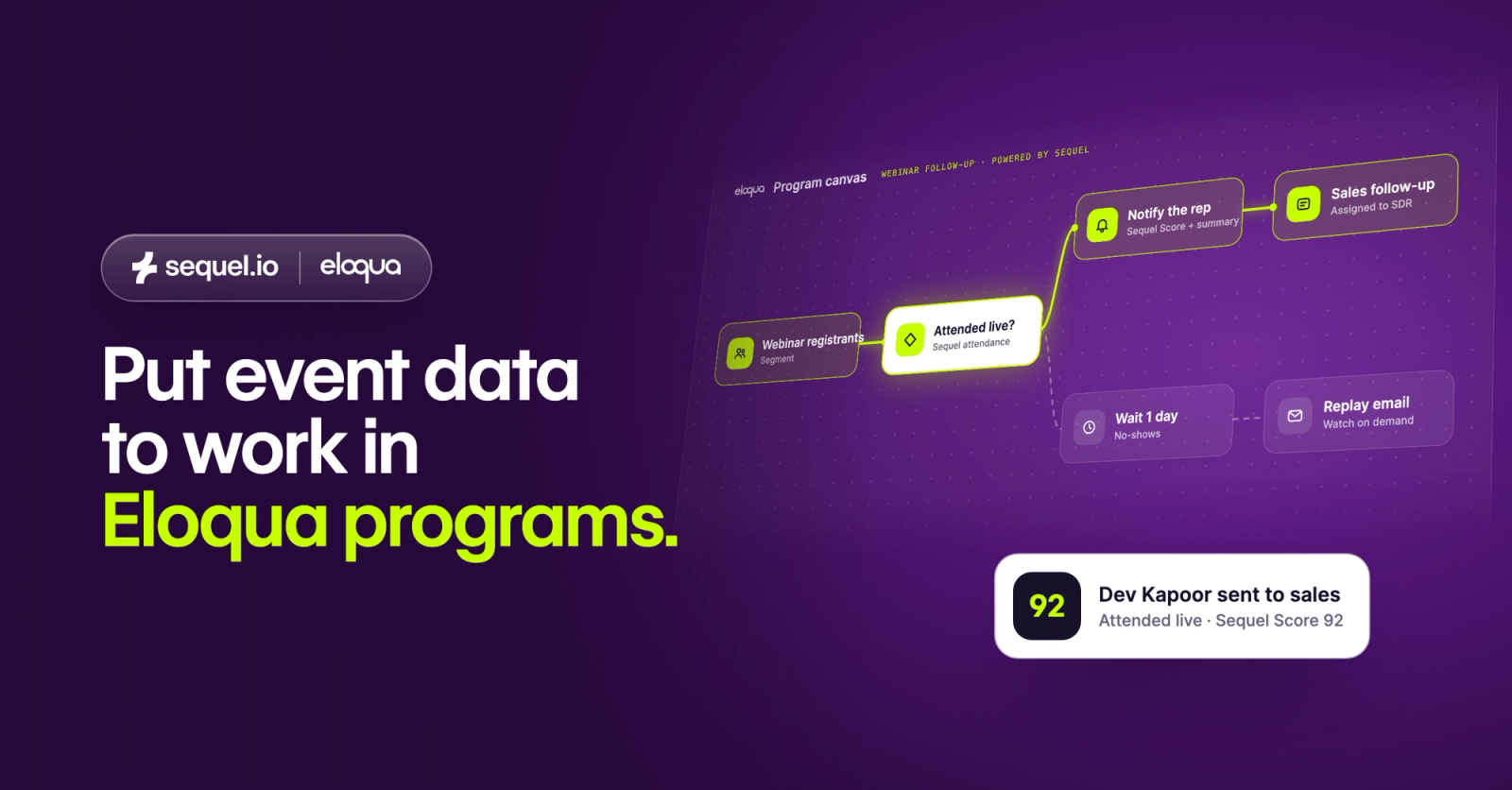
Sequel’s native Eloqua integration connects event activity to the programs and reporting your team has already built. Connect once with a dedicated Eloqua API user, then send each attendee’s registration and engagement to Eloqua as a contact, shared list member, and single custom object record per person per event.
Together, Sequel and Eloqua turn webinar engagement into contact data and signals your existing programs can use for timely follow-up.
Event data only helps when your programs can use it
Eloqua teams build nurture and reporting on the data in Eloqua. If registration or attendance activity isn’t there, program canvases can’t act on it. When registration and attendance need to update the same custom object record, matching them by hand adds another step, and another opportunity for records to fall out of sync.
That leaves teams choosing between slower follow-up, manual reconciliation, or building and maintaining a separate connection. For enterprise teams, the integration also has to fit their security requirements.
For enterprise teams that run their programs in Eloqua
This integration is designed for organizations that use Oracle Eloqua for marketing automation:
- Marketing Ops teams that want event data in the structure their programs already use, without maintaining a separate connector.
- Demand generation and field marketing teams whose nurture and campaign reporting depend on knowing who registered, attended, or watched on demand.
- Security and IT teams that require vendors to connect through a dedicated Eloqua API user.
- Sales leaders who want the Sequel Score and engagement summary on the Eloqua contact their reps already use.
Workarounds keep your team responsible for the handoff
Without a direct connection, event data often reaches Eloqua through middleware, custom code, or manual reconciliation.
- Middleware needs ongoing care. Integration platforms such as Tray can move attendees into Eloqua, but someone must update the workflow when fields or requirements change.
- Custom code adds a maintenance burden. An engineering team may build a webhook receiver, then still need to make sure registration and attendance land on the right Eloqua records.
- Some connection methods can create a security hurdle. An installed app or personal OAuth sign-in may not fit a policy that requires vendors to use a dedicated API user.
Each workaround needs an owner. A native connection gives Eloqua teams a more direct path for getting event data into the programs they rely on.
Connect Sequel and Eloqua through a dedicated API user
There’s no middleware or Eloqua app to install. An admin enters the Eloqua company name, API user name, and password in Sequel. Sequel identifies the right Eloqua data center. Once connected:
- Registration syncs as it happens. Sequel creates or updates the Eloqua contact by email, adds the person to the event’s shared list, and creates a Registered record on your custom object.
- Attendance updates that same record. When the event ends, Sequel updates the record to Attended or No Show, along with engagement such as minutes watched, poll responses, Q&A, and CTA clicks. On-demand viewing updates every 24 hours.
Sequel writes one record per person per event, matched by a key built from the event and the person’s email. Registration, live attendance, and replay viewing update that same record, reducing duplicate cleanup.
Sequel doesn’t add people to Eloqua campaigns. Each event record carries the Eloqua campaign ID, and your programs can pick people up by listening to the custom object or shared list. Your Eloqua logic stays in control.
Use event data in the structure your team already trusts
- Set up your custom object once. Map the custom object and its fields at the company level, and use those defaults for new events. Shared lists and campaigns remain event-specific.
- Map the fields your programs rely on. Send totals such as minutes viewed and percent viewed, poll and question responses, CTA and resource clicks, registration answers, UTM parameters, and fixed event values such as region or business unit.
- Protect values already in Eloqua. Sequel doesn’t send blank values, so it won’t overwrite a field with a blank.
- Use Eloqua picklists in registration forms. Add a CRM dropdown question and choose an Eloqua contact field. Its answer options come from that field’s picklist, so registrants choose values Eloqua already accepts.
- Put Sequel engagement context on the contact. Map Sequel Score, AI engagement summary, and recommended next step to Eloqua contact fields. These update after each event and when new on-demand views arrive.
- Keep credentials protected. The API user password is encrypted with AWS KMS, decrypted only when a send is made, and never logged. Sends are paced and retried if Eloqua hits a rate limit or outage.
What this looks like in practice
Connect within a strict security standard. An enterprise security team requires vendors to connect through an Eloqua API user. The Eloqua admin creates a dedicated user and connects it in Sequel. Event data then reaches a shared list and one custom object record per attendee, ready for existing program canvases to use.
Replace middleware maintained just for event data. A Marketing Ops team uses Tray to move webinar attendees into Eloqua. They map the fields in Sequel instead and receive on-demand viewing updates every 24 hours without maintaining a separate workflow.
Retire custom matching code. An engineering team built a webhook receiver to create Eloqua records and match registration with attendance. Sequel now handles that matching, so Marketing Ops can manage field mapping in Sequel.
Give sales engagement context on the contact. Marketing Ops maps Sequel Score and the engagement summary once. Both update on the Eloqua contact after events and replay views, where sales can find them.
Getting started
You must be on Sequel’s Enterprise plan to use this integration. Once Eloqua is enabled for your account, connect it in Sequel:
- In Eloqua, create a dedicated API user (not an SSO login). Its security group needs permission to manage contacts and edit custom objects, and access to the shared lists, campaigns, and custom objects Sequel will use.
- In Sequel, go to Marketplace and open Eloqua.
- Enter your Eloqua company name, API user name, and password, then connect.
- Choose what syncs: contacts on registration, engagement after the event, or both.
- Set company defaults by selecting your custom object and mapping its fields, contact fields, and Sequel intelligence fields.
- In each event’s CRM tab, choose the shared list and, optionally, the Eloqua campaign.
Your custom object needs a Unique Code field and an Email Address field. Sequel will tell you what to set up in Eloqua if either is missing. Contact your Customer Success Manager with setup questions.
Learn more about Eloqua setup in our help center.
Availability
The Eloqua integration is available on Sequel’s Enterprise plan. If your team runs on Eloqua, contact your Customer Success Manager to ask about enabling the integration for your account.
To see how it fits with Sequel Score and your existing Eloqua programs, get a demo.