Run a professional certification program — directly on your website.
Sequel tracks real-time watch time, issues branded credentials, and handles all pass/fail communications automatically — inside the webinar, and on your website.
- Watch-time threshold
- Polls and quizzes
- Branded certificate
- Audit trail
Certification programs shouldn't require manual workarounds
Compliance training, partner certification, continuing education — the webinar is easy; what follows is hours of exporting attendance data, calculating who watched enough, generating certificates one by one, and chasing down the gaps in a spreadsheet no one wants to own.
Everything certification-related, handled inside Sequel.
Real-time watch-time tracking
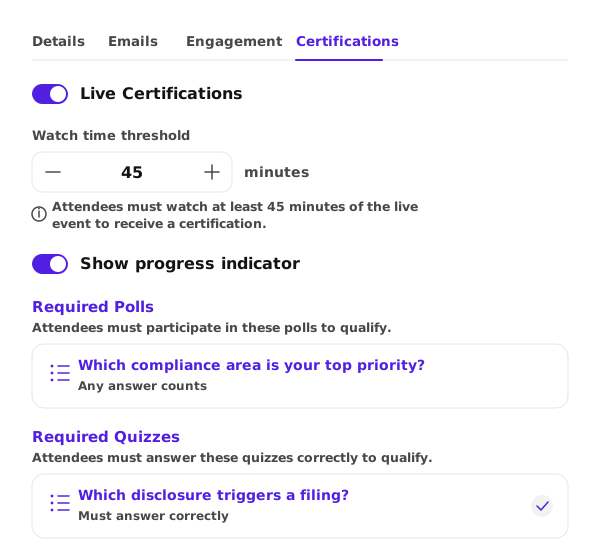
Sequel tracks actual watch time against the completion threshold your program requires (75%, 80%, whatever the standard is), so compliance records reflect what attendees watched, not attendance logs or self-attestation.
Poll and quiz certification requirements
Beyond watch time, you can require attendees to complete polls or correctly answer quiz questions to earn certification, so credentials reflect real engagement and knowledge retention, not just passive viewing.
Instant certificate delivery
The moment an attendee crosses your threshold, Sequel generates a branded PDF certificate available for download before the session even ends, so attendees get credentials immediately and you get zero certificate request emails.
Automated pass/fail communications
Sequel automatically emails qualified attendees their certificate and non-qualified attendees your specified next steps, so no one misses a follow-up because someone forgot to export the right column.
Certification dashboard
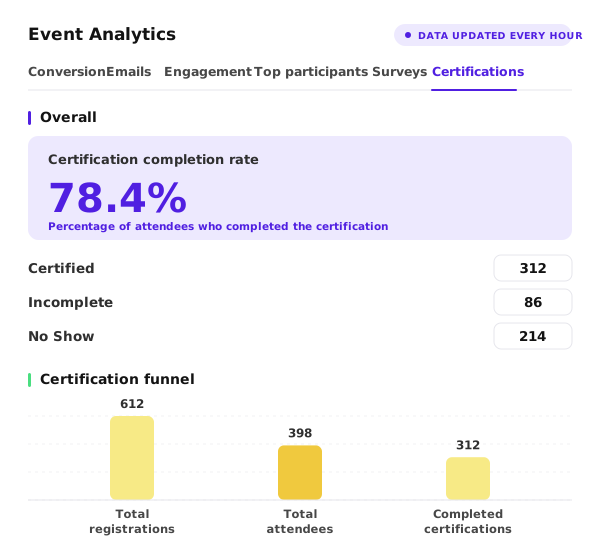
Every certification event gets its own analytics view — eligible attendees, completion rates, certificate status, and a full audit trail — so compliance reviews run off the same data that powered the event.
Optional: live progress bar
Show attendees how close they are to the threshold during the session to keep them engaged and cut down on “did I qualify?” emails afterward.
Configure once. Run the event. Done.
Step 1
Set your requirements
Choose your watch-time threshold, and optionally require attendees to complete polls or answer quiz questions correctly to qualify — enable the live progress bar if you want attendees to see their status in real time.
Step 2
Run the event
Sequel tracks watch time and poll/quiz responses automatically as your webinar runs on your website, with any required polls or quizzes appearing on schedule — nothing extra to set up mid-session.
Step 3
Certifications go out
Attendees who met every requirement receive their certificate, everyone else gets a follow-up message, and all status data is in your dashboard, ready for reporting or export.
Certification data belongs in your engagement layer, not a sidecar.
Watch time, certificate status, and post-event engagement flow into the same attendee record as every other webinar behavior in Sequel — and sync to your CRM and MAP, so a contact who completed certification and visited your pricing page shows up as a distinctly stronger signal than one who registered and dropped off at minute six.