How Sequel’s marketing team turns webinar and website engagement into individualized BDR follow-up using Sequel AI Intelligence, Claude, HubSpot, and Apollo.
After a webinar, most BDRs get some version of the same handoff: a registration list, an attendance field, maybe a spreadsheet with poll responses and questions.
Then the clock starts.
Someone has to figure out who is worth contacting, check whether sales is already talking to them, find something relevant to say, write the email, load the sequence, and start outreach while the event is still fresh.
That gets harder when the event is large. It gets much harder when you want the email to reflect what each person actually cared about instead of dropping a first name and company into the same template.
We recently automated most of that process inside Sequel.
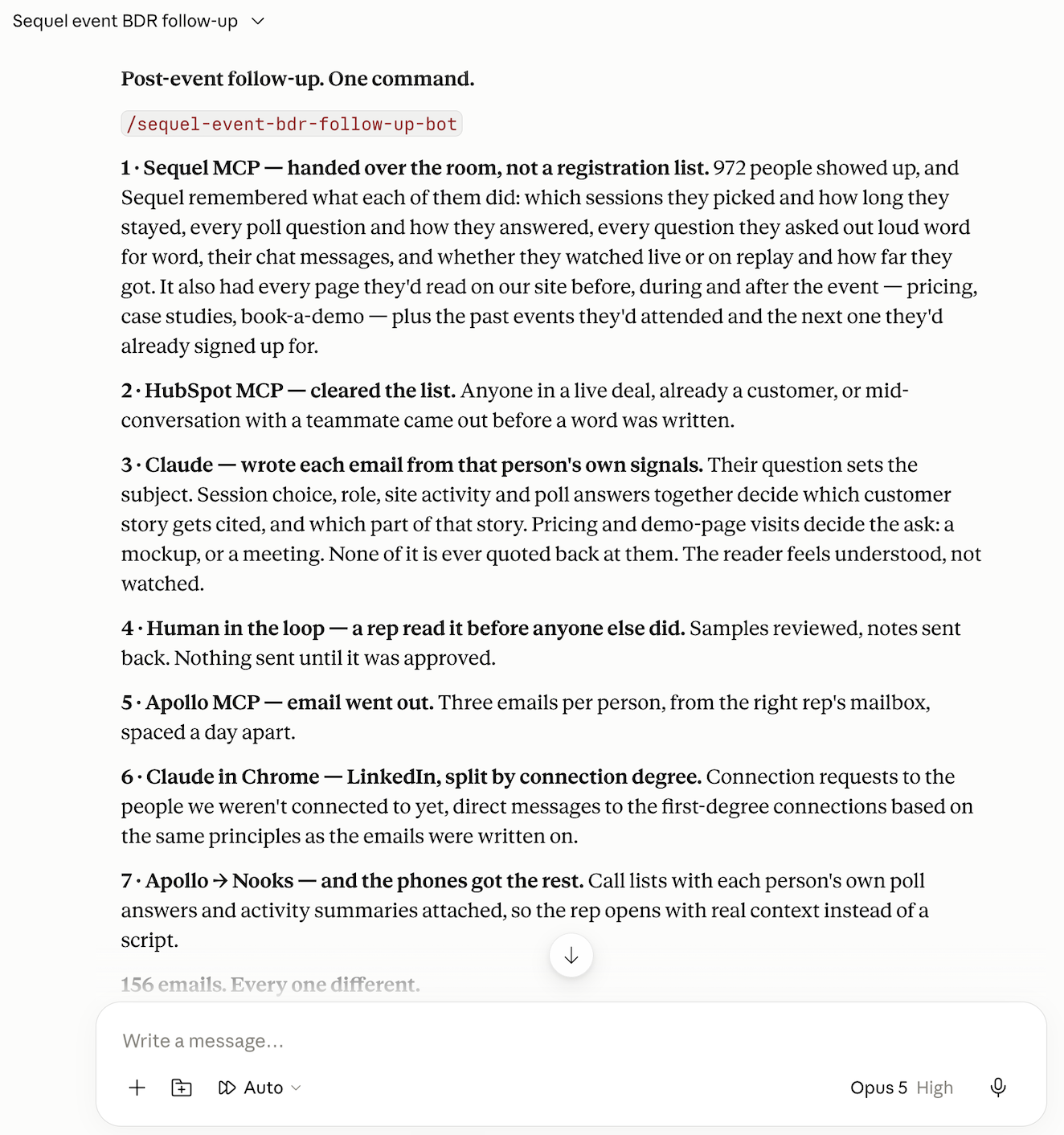
After a virtual summit with nearly 1,000 registrants, our BDRs used Sequel AI Intelligence along with our Sequel MCP Server and a Claude Skill we built to process the audience, understand each person’s engagement, remove customers and active opportunities, prioritize the remaining prospects, write individualized follow-up, and activate outreach through Apollo.
The workflow doesn’t stop with the people who attended live. It handles no-shows separately and keeps picking up people who watch the replay days or weeks later.
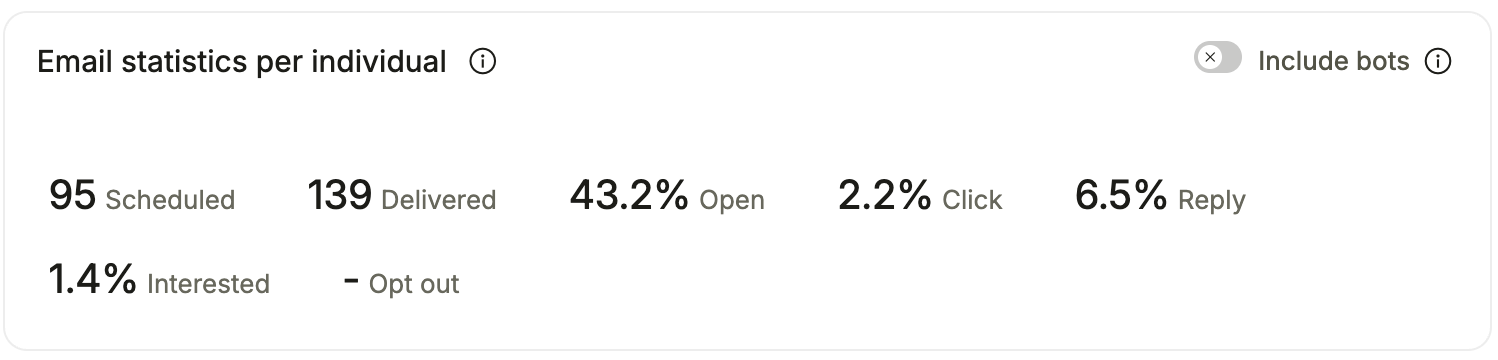
On one attendee sequence, the bot-filtered Apollo results showed a 43.2% open rate and 6.5% reply rate - nearly double Apollo’s average open rates of 21 - 28% and average reply rate of 3 - 5%. And within just 24 hours of the follow-up sequence launching, the team had generated over $100,000 in net new pipeline.
The interesting part isn’t that AI can write an email. Plenty of marketers are already doing that, but the results are either creepy in how they personalize, or irrelevant given the subject of the email.
Getting personalization right is all about what the AI knows before it starts writing, and that’s where Sequel is uniquely positioned to help.
Why most automated webinar follow-up still feels generic
Personalization is usually constrained by the data available to the person or system writing the email.
A CRM can tell you someone’s name, title, company, lifecycle stage, and perhaps that they “attended webinar.”
That isn’t much to work with.
A webinar produces much richer context. Someone chose one session over another. They stayed for 48 minutes. They answered a poll a certain way. They asked a question about implementation. They watched the replay instead of attending live.
And because Sequel webinars run directly on the company website, those event signals can sit alongside what the same person did around the event: what they explored before registering, whether they visited a product page afterward, what other sessions they watched, and whether they returned later.
Sequel AI Intelligence turns that behavior into usable context, including an engagement summary, intent-based scoring, and a recommended next step.
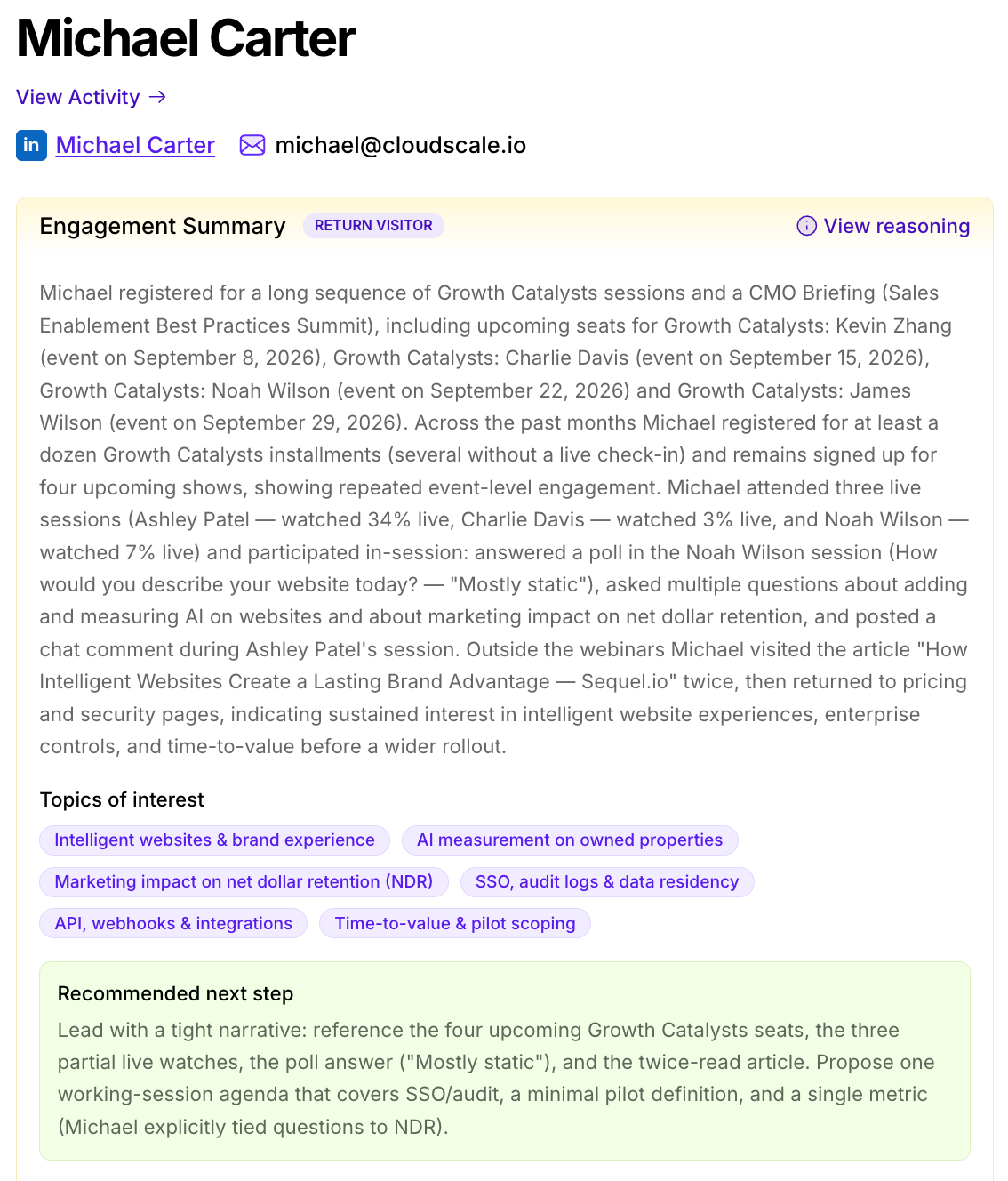
That is the foundation of our follow-up workflow. Claude isn’t starting with a row in a registration spreadsheet. It has context about the relationship.
Step 1: Process the event audience through Sequel AI Intelligence
Our workflow starts when the webinar ends.
For our recent Human Moments, Agentic Momentum virtual summit, Sequel AI Intelligence was run across the full registration audience. That creates a synthesized view of each person before any outreach is written.
This distinction matters. You could send every raw data point into a model and ask it to figure out what matters, but then the writing agent is also being asked to interpret the event, evaluate the buyer’s behavior, decide what is meaningful, and write the message all at once.
We separate those jobs.
Sequel AI Intelligence does the work of understanding the engagement first. The downstream agent can then use that context to decide how to follow up.
For our team, that context can include live and replay participation, watch behavior, questions, polls, prior Sequel events, and relevant activity on the Sequel website before and after the event.
Step 2: Separate attendees, no-shows, and replay viewers
The first thing our BDR team’s Claude Skill does with the event data is establish who actually engaged and how.
Someone who spent 45 minutes in a summit session should not get the same follow-up as someone who registered and never appeared. Neither should someone who skipped the live event and watched the replay four days later.
So those groups are treated differently from the start. Live attendees go first because they have the freshest context and, in our experience, tend to produce substantially stronger response rates. No-shows get their own wave with messaging appropriate to someone who registered but did not attend.
Most importantly, replay engagement stays open-ended. A webinar audience does not stop changing when the live broadcast ends. People keep watching on demand, sometimes for weeks. When the webinar and replay live on your website, like they do with Sequel, that later consumption becomes another signal the follow-up system can act on.
The post-webinar sequence therefore becomes an ongoing motion rather than a one-time attendee export.
Step 3: Remove anyone sales should not prospect
Before Claude writes a word, the Skill checks HubSpot, which we use as our CRM and MAP. Customers, contacts associated with active deals, and anyone already in a live sales conversation with another teammate come out.
This is one of the less glamorous parts of the automation, and one of the most important.
A system that can generate 500 personalized emails quickly can also generate 500 awkward mistakes quickly if account ownership and CRM state are ignored.
For our BDR team, CRM suppression happens before personalization. The model only writes for people who have cleared the rules the team already uses to decide who should enter BDR outreach.
This is also where automation stops starts becoming a real GTM workflow. The email is only one output - the system has to understand who should receive it in the first place.
Step 4: Prioritize the people worth acting on first
Not every remaining prospect gets treated as equally urgent.
The Skill uses the engagement context to help prioritize the audience, and it creates call lists early in the process so our BDRs can begin dialing in Nooks while the rest of the follow-up is being prepared.
That lets multiple channels move in parallel.
The useful signal could be straightforward, such as sustained attendance. It could be a question asked within the webinar chat that suggests someone is evaluating how Sequel would work in their environment. It could be repeated engagement across events. Or it could be the combination of event behavior and subsequent website activity, including things like pricing or product page views.
This is where richer first-party context starts to matter. “Attended webinar” is a binary field, whereas “Attended the operations session, asked about CRM workflow, then returned to the relevant product content” tells you something you can actually use to personalize follow up in a way that feels truly relevant for the buyer.
Step 5: Let the person’s signals determine the email
This is the part most people think of when they hear “AI-personalized email,” but by now most of the hard work has already happened.
Claude has an eligible prospect, their Sequel Intelligence context, their event behavior, and enough background to decide what the email should actually be about.
Our BDR team’s Skill uses those signals to make several choices.
- A question someone asked can influence the subject and opening.
- The virtual summit breakout session they chose, their role, poll responses, and website activity can determine which customer example is relevant.
- Stronger buying behavior can justify a more direct ask.
- Lighter engagement should produce a lighter message.
There is one important rule: use behavior as context, not as copy.
The goal is not to send someone an email saying, “I saw you watched 73% of our session and visited the pricing page twice.”
That technically proves personalization, but it also makes the reader feel observed rather than understood.
Instead, those signals should change the substance of the outreach.
If someone spent their time learning about attribution, write about attribution. If their behavior points toward integrations, choose that angle. If there is not enough evidence to justify a sales conversation, do not manufacture one.
The reader should feel like the email is relevant to what is on their mind. They should not feel like you are reading an activity log back to them.
Step 6: Use a human to calibrate judgment before you scale
Our BDRs have tested the Skill enough that they no longer need to manually approve every email, but they do review the system before trusting it at scale.
When we first set the workflow up, the BDR team had Claude generate a sample of roughly 20 emails and read through them carefully. They rewrote several themselves, showed Claude what they would have done differently, then generated another batch and checked again.
That feedback became part of the Skill.
This is a much more useful definition of “human in the loop” than requiring someone to click approve hundreds of times.
The human is there to establish the standard, which defines things like: Does the message sound like the BDR? Is it too aggressive? Is it making too much of a weak signal? Did it choose the right customer story? Is the ask proportionate to what the prospect actually did?
Once the model is consistently making those decisions well, automation can take on far more of the execution, while the rep keeps the judgment.
Step 7: Push the follow-up into the systems the BDR already uses
Once the samples pass review, Claude activates the outreach through Apollo.
The current Skill prepares a short personalized sequence for each prospect and routes it through the appropriate rep mailbox. Sends are scheduled around the recipient’s local time rather than firing one mass batch from a marketing address.
The same context also supports the rest of our BDR follow-up.
For prospects who are not already connected on LinkedIn, the workflow can send a blank connection request rather than cramming a pitch into the invite. Existing first-degree connections can get a direct message informed by the same engagement context.
Call lists are pushed into the dialing workflow with engagement summaries and relevant poll responses attached, so BDRs can open a conversation with actual context rather than a generic post-event script.
When the run finishes, the workflow posts a summary for the team.
One command coordinates the work, but the useful part is that every channel starts from the same understanding of the prospect.
Step 8: Run the motion again as new engagement appears
Traditional post-webinar follow-up has a natural cutoff. You export the attendee list, send the sequence, and move on.
On-demand viewing breaks that model.
Someone who misses the live event may watch almost the entire replay three days later. Another person may return after two weeks because a colleague shared the session. Someone who attended live may come back and watch a second session.
Those are fresh moments of engagement.
Our BDR team’s Skill is built to keep processing replay viewers as they arrive instead of treating the live attendance report as the final audience.
The same is true for no-shows. They are not ignored, but their follow-up is kept separate because the level of demonstrated engagement is different.
That distinction showed up clearly in the results.
What happened when we used it
For the cohort we recently emailed following our Human Moments, Agentic Momentum virtual summit, attendees responded much more often than people who registered but did not show.

That is roughly a 5x difference in reply rate.
The Apollo sequence view gives another useful lesson about measurement. With bot activity included, the platform showed a 60.4% open rate. Once bot opens were excluded, the open rate dropped to 43.2%, while the reply rate remained 6.5%.
We use the bot-filtered number to measure our email performance, and were pleased to see that even with bots filtered out, personalization helped the team nearly double Apollo’s average open rates of 21 - 28% and average reply rate of 3 - 5%.
Best of all, within 24 hours of launching the emails, the team had generated over $100,000 in net new pipeline.
The operational change was immediate: a BDR could move from a large webinar audience to prioritized, context-aware outreach without spending hours exporting files, reconciling records, researching people one by one, and writing hundreds of variations manually.
The email is the last mile, not the starting point
It is easy to look at a workflow like this and think that the breakthrough is AI-generated copy, but that’s actually the most replaceable part of it. Any capable model can draft an email. The harder problem is giving it enough context to know which email should actually be sent, who should receive it, what that person appears to care about, how strong the buying signal really is, and what the rep should do next.
That is why the webinar architecture underneath the workflow matters.
Sequel is a webinar platform built to run webinars on your website. That means the event happens in the same owned environment where the rest of the buyer’s digital relationship is taking place - and it means event behavior sits alongside website behavior instead of becoming an isolated attendance record.
Sequel AI Intelligence can then turn those signals into an engagement summary, score, and recommended next action that can move into revenue workflows.
Our internal marketing team has taken that one step further by letting an agent use the context to execute work across our GTM stack.
The exact stack is less important than the model behind it. You might use Salesforce instead of HubSpot, or a different sales engagement platform instead of Apollo. Our internal implementation also uses MCP connections (including Sequel’s MCP connector) that will not necessarily map one-for-one to every customer setup.
The durable part is the sequence of decisions: understand the engagement, respect the CRM context, decide who deserves action, use the signals to make the outreach relevant, let a human calibrate the standard, then automate the repeatable work.
Make webinar follow-up part of the webinar system
The best time to think about personalized webinar follow-up is not after you download the attendee CSV.
It is when you decide what your webinar technology will know about the people who participate.
If the system only knows that someone registered or attended, AI can make your generic follow-up faster.
If it understands the broader relationship, what they watched, what they asked, what they explored, and what they did next, agents have something much more useful to work with.
That is the role Sequel AI Intelligence plays in our own workflow.
Sequel runs the webinar on the website. Engagement creates the context. AI Intelligence turns that context into something actionable. Then agents can carry it into the work that follows.
The webinar ends.
The understanding does not.
Frequently Asked Questions
How quickly should you follow up after a webinar?
As quickly as your data and account rules allow you to do it well. Speed does not help if the rep contacts a customer, steps on an active opportunity, or sends a message that misreads the person’s behavior.
In our workflow, the system does the audience processing and CRM checks first, then begins activating channels. The Skill is designed to get call lists ready within minutes, while email sends can be timed for the recipient’s local timezone.
What should a personalized webinar follow-up email use?
Use evidence of what the person cared about. That can include the session they chose, questions they asked, poll responses, relevant content they consumed, replay behavior, previous event engagement, and related website activity.
The important distinction is how you use it. The behavior should influence the message rather than appear as a list of things you tracked.
Should webinar no-shows get the same follow-up as attendees?
Our results suggest they should not. People who attended had demonstrated substantially more interest, and their reply rate in this campaign was about five times higher than the no-show cohort.
A no-show still gave you a signal by registering. It is simply a different signal and deserves different messaging.
Can you automate webinar follow-up without removing the human?
That is how we think it should work. Our BDR team doesn’t need to hand-write every email, but they set the standard for what a good one sounds like. Each BDR reviews samples, rewrites the messages that miss, and feeds that judgment back into the workflow.
AI handles execution at a scale that would be unrealistic manually. The rep remains responsible for judgment.
What about people who watch the webinar on demand?
Treat replay engagement as current engagement. A person who watches deeply three days after the live event may be more interesting than someone who joined live for five minutes.
When the replay remains on your website and viewer behavior continues flowing into the same audience context, you can keep responding to those moments instead of ending the campaign when the live event ends.