Extended Registration Statuses
Any marketer who has run an event program knows the scenario: your team is preparing for an executive roundtable. Invitations have gone out, registrations are coming in, and the event is approaching capacity. But a few important questions remain. Who has accepted? Who is waiting for approval? Which prospects are on the waitlist? Has anyone canceled, opening a seat for someone else?
These distinctions matter. Someone awaiting approval shouldn't receive the same confirmation as a registered attendee. A person who declined an invitation shouldn't keep receiving reminders. And a canceled registration shouldn't count toward expected attendance.
Yet event reporting often reduces participation to three categories: registered, attended, and no-show. Those statuses tell marketers what happened at the event. They reveal much less about everything leading up to it.
The information often exists across registration forms, email responses, spreadsheets, and CRM records. Keeping it accurate and actionable is the harder part.
Registration is more than a form submission
Not every event follows the same registration process.
An open webinar might allow anyone to register immediately. An executive roundtable may require approval. A customer workshop could have limited capacity. An invitation-only session needs a way to distinguish accepted invitations from declined ones.
As event programs become more sophisticated, so does the work surrounding them.
Event Marketing needs accurate guest lists. Demand Gen needs to know which contacts should receive which communications, and Marketing Operations needs registration information to flow reliably into CRM and marketing automation systems.
When those teams work from different or incomplete records, the consequences are practical: unnecessary follow-up, manual data cleanup, inaccurate audience counts, and confusing attendee experiences.
These problems matter even more as marketing teams are expected to run more programs with fewer resources while demonstrating their contribution to pipeline. Better event execution depends on understanding where people stand, not just whether they eventually show up.
A registration status should tell you what happens next
Consider five people who haven't attended an event. One was invited but never responded. Another declined. A third is awaiting approval. A fourth is on the waitlist. The fifth registered and later canceled.
They're all absent from the confirmed attendee list, but for entirely different reasons, and each situation calls for a different decision. The pending registrant needs an approval decision. The waitlisted prospect may need an update about availability. The canceled registrant should no longer receive messages intended for confirmed attendees.
The same distinctions matter for reporting. Invitation acceptance, approval rates, cancellations, and attendance all tell different stories about an event program's performance.
The goal isn't more categories for their own sake. It's having enough context to make the right decision without reconstructing someone's registration history. That requires registration information to stay connected to the tools where marketing teams already work.
When detailed statuses flow into Salesforce, Marketo, or HubSpot, teams can use them to inform segmentation, campaign reporting, and existing automation workflows instead of managing separate lists.
Introducing Extended Registration Statuses in Sequel
Sequel's new Extended Registration Statuses gives marketers a more complete view of the registration lifecycle, from invitation through attendance.
Previously, Sequel's basic status view focused on registered, attended, no-show, and on-demand participation. Now, customers can enable additional statuses within an event:
- Invited: Someone has received an invitation but hasn't accepted.
- Waitlisted: Someone is waiting for availability at a capacity-limited event.
- Pending Approval: Someone has requested registration but hasn't been approved.
- Rejected: A registration request has been rejected.
- Declined: Someone has declined an event invitation.
- Canceled: Someone has actively canceled a confirmed registration.
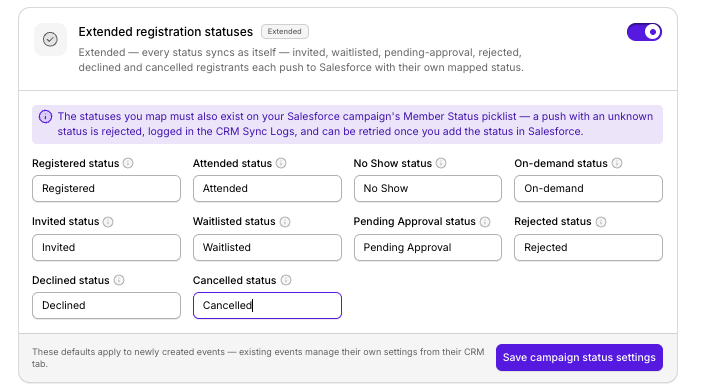
These work alongside Sequel's existing registration and attendance statuses, giving marketers a more accurate picture of their audience.
The new statuses reflect Sequel's existing controls for invitation-only registration, approval requirements, and waitlists.
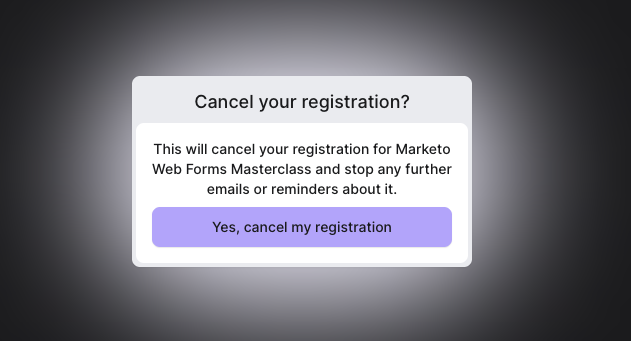
The release also introduces self-service registration cancellation. Marketers can add a Cancel My Registration link to event emails. When a registrant follows the link, they can confirm their cancellation, updating their registration status without needing to contact the organizer.
Extended statuses can also be passed into connected Salesforce campaigns and Marketo programs when the corresponding statuses are configured.
HubSpot supports Registered, Attended, No-show, and Canceled through Marketing Events. Additional statuses can be sent to a mapped HubSpot contact property. Because this property can be overwritten when someone registers for another event, teams should account for that limitation when building workflows.
Together, these improvements give marketers better registration visibility and more accurate information in the systems they already use.
What this looks like in practice
The benefits become clear in the everyday decisions event teams make.
Event Marketing: Managing a workshop with limited seats
A customer workshop reaches capacity, but registrations keep coming in. With waitlisting enabled, the Event Marketing team can distinguish confirmed attendees from people waiting for a seat. If someone cancels, the cancellation is reflected in their registration status, giving the organizer clearer information for managing capacity and the waitlist. Instead of relying on a separate spreadsheet, the team can work from more accurate participation records.
Demand Generation: Sending more relevant event communications
A Demand Gen team is preparing reminders for an upcoming webinar. Some contacts have registered. Others declined their invitation or canceled after registering. With detailed statuses available in connected marketing systems, the team can build segments that reflect those differences. Confirmed registrants can receive reminders, while people who declined or canceled can be excluded from communications that no longer apply. The result is fewer irrelevant messages and follow-up that better reflects each person's decisions.
Marketing Operations: Improving CRM data quality
A Marketing Operations Manager needs registration data to remain consistent between Sequel and Salesforce or Marketo. Instead of manually distinguishing approval requests, cancellations, and confirmed registrations, the team can configure corresponding statuses in its CRM or marketing automation platform. That gives Marketing Ops more accurate campaign records and reduces the work required to reconcile participation data.
Field Marketing: Managing invitation-only executive events
A Field Marketing team is organizing a small executive roundtable with an approval process. The team needs to distinguish invitees, pending applicants, rejected requests, and confirmed participants. Extended Registration Statuses makes those differences visible, helping organizers manage approvals and communicate appropriately without treating every form submission as a confirmed registration.
Better registration data contributes to better audience understanding
Registration is one part of a much longer relationship between a company and its audience.
Before attending a webinar, someone may have explored product pages, watched earlier sessions, or engaged with other content. During the event, they may ask questions, respond to polls, or click a call to action. Afterward, they might watch the replay or explore additional resources.
These aren't isolated interactions. They're different moments in the same relationship.
That's the thinking behind Sequel's owned-site approach. Because Sequel hosts webinars and video directly on a company's website, it can connect video engagement with broader first-party website behavior.
Audience Insights helps marketers understand those interactions in context, Sequel AI Studio helps extend the value of the content created during events, and Extended Registration Statuses complements that foundation by making an earlier stage of participation easier to understand.
It doesn't introduce new AI functionality or Audience Insights reporting. It improves the registration information that marketing teams use alongside Sequel's broader engagement data, and that matters because understanding an audience starts before someone joins the webinar.
Getting started
Extended Registration Statuses is available now on all Sequel plans, including Growth, Business, and Enterprise, at no additional cost.
To use the feature, open an event in Sequel and enable the Extended Registration Statuses toggle. If your event uses invitation-only registration, approval requirements, or waitlists, the relevant statuses will reflect those workflows. To offer self-service cancellation, add the Cancel My Registration variable to your event emails.
Customers using Salesforce or Marketo should configure the corresponding status values in their campaigns or programs. HubSpot customers can map additional statuses to a contact property through HubSpot Property Targets.
For detailed instructions, visit the Sequel Help Center.
Better follow-up starts with knowing where people stand
An event doesn't begin when the webinar goes live. It begins when someone receives an invitation, requests a seat, or decides whether to participate. Those decisions create useful context, but only when marketing teams can see and act on them.
Extended Registration Statuses makes that context easier to access, helping teams maintain accurate records, manage event audiences, and communicate more thoughtfully. Because better event follow-up isn't just about knowing who attended. It's about understanding what happened before, during, and after the event, and using that understanding to make the next interaction more relevant.
Extended Registration Statuses is available now on every Sequel plan. Explore the new statuses in your next event or get a demo to see how Sequel can help you drive greater ROI from your virtual and in-person events.
Frequently Asked Questions
What are Extended Registration Statuses in Sequel?
Extended Registration Statuses is a Sequel feature that gives marketers more visibility into the event registration process. In addition to basic statuses like Registered, Attended, and No-show, teams can track whether someone has been invited, waitlisted, is pending approval, has been rejected, declined, or canceled. This helps marketers manage event audiences, maintain accurate records, and deliver more relevant follow-up.
Who should use Extended Registration Statuses?
Extended Registration Statuses is designed for B2B Demand Generation, Event Marketing, Field Marketing, and Marketing Operations teams. It's especially useful for managing invitation-only webinars, executive roundtables, approval-based registrations, and events with limited capacity. Teams can use the additional information to improve audience segmentation and registration management.
How do I enable Extended Registration Statuses in Sequel?
Extended Registration Statuses can be enabled using a toggle within an individual Sequel event. When enabled, the event displays additional registration statuses alongside the standard registration and attendance statuses. Teams can choose whether to use the extended view based on the needs of each event.
Can attendees cancel their own event registration in Sequel?
Yes. Sequel allows organizers to add a Cancel My Registration link to event emails using a built-in email variable. When attendees select the link, they're directed to a confirmation page where they can confirm their cancellation, automatically updating their registration status to Canceled.
Does Sequel sync extended registration statuses with Salesforce, HubSpot, and Marketo?
Yes. Sequel supports extended registration status synchronization with Salesforce, Marketo, and HubSpot, with some differences between integrations. Salesforce campaigns and Marketo programs must have the corresponding status options configured. HubSpot Marketing Events supports Registered, Attended, No-show, and Canceled, while additional statuses can be mapped to a HubSpot contact property that may be overwritten when a contact registers for another event.
Is Extended Registration Statuses included in all Sequel plans?
Yes. Extended Registration Statuses is included in all Sequel plans, including Growth, Business, and Enterprise, at no additional cost. Customers can enable the feature within their events without upgrading or purchasing an add-on.
Can Sequel track event registration approvals and waitlists?
Yes. Sequel supports approval-based registration and capacity-limited events with waitlists. Extended Registration Statuses makes it easier to distinguish between people awaiting approval, rejected applicants, waitlisted contacts, and confirmed registrants. This helps event teams manage attendance and communicate appropriately with each group.
How is Sequel's event registration management different from using spreadsheets or separate registration tools?
Sequel combines event registration management, website-hosted webinars, and supported CRM integrations within one platform. Instead of manually tracking invitations, approvals, waitlists, and cancellations across spreadsheets and disconnected tools, marketers can manage those registration states in Sequel and send supported status information to their CRM or marketing automation platform. Because Sequel also hosts webinars directly on a company's website, event participation can be understood alongside broader first-party website engagement through its audience intelligence capabilities.