MCP Server
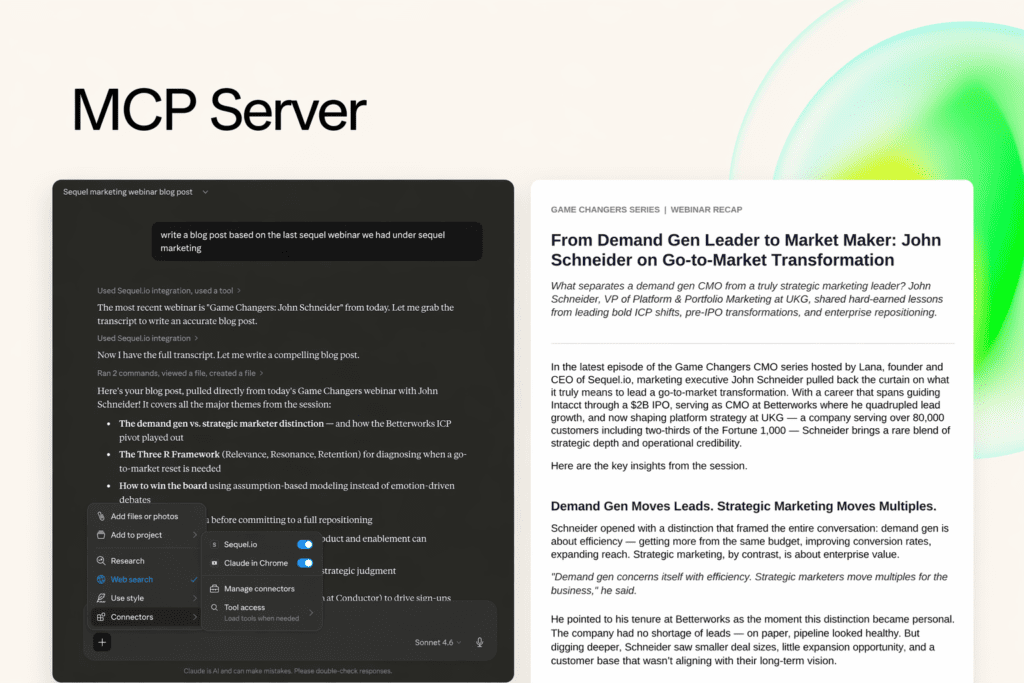
Turn Your Webinar Data Into Content, Insights, and Pipeline Inside Any AI Tool
If you run webinars regularly, you already know how valuable that content is. Each session captures real conversations with your audience and holds insights you can turn into blogs, social content, campaigns, and sales enablement. But turning that content into something usable usually forces a tradeoff.
Today, marketers have two options. They can download their webinar content and move it into another system, such as an AI tool or a separate editing platform where they can repurpose it into clips, articles, or campaigns. Or they can stay inside their webinar platform and use whatever built-in tools are available there.
Both approaches work, but they leave a gap relating to how modern marketing teams actually operate.
Sequel's MCP server gives marketing teams a different way to work. It connects your webinar data directly to the AI tools your team already uses, making your events accessible inside Claude, ChatGPT, and any other AI that supports the Model Context Protocol.
The goal is simple. Take the conversations you are already running on your website and make them usable everywhere your team works.
What's New: The MCP Server Does More Than Transcripts
When the MCP server first launched, it focused on one thing: transcript access. You could connect Sequel to an AI tool and pull the text of your webinars into a prompt.
That was the starting point. The MCP server now reads more than raw transcripts, and it's expanding toward taking action and pulling live engagement data, not just content.
Here is where things stand.
Available now: The MCP server is live. You connect it from anywhere using a public URL with an auth ID, and as a Sequel admin you can access your space and start prompting immediately. What's in production today is the repurposing capability: the server can read all of your transcripts and all of your past events, then create blog posts, LinkedIn posts, and other content from them. It works across all of your Sequel workspaces. If you have more than one, it will ask which workspace you want to use, and it can read in-person events as well as virtual ones.
Expanding soon: The next wave extends the MCP server from working with content to working with your platform and your data. The planned expansion includes:
- Creating and modifying sessions directly from your AI tool
- Pulling AI summaries generated by Sequel
- Getting a list of your top leads
- Reading analytics and Audience Insights data, so you can feed it somewhere else
This is the shift worth understanding. The MCP server started as a way to get content out of Sequel. It's becoming a way to run Sequel, surfacing the same data and actions you'd take inside the platform from whatever AI environment your team works in.
There's a connection here to Sequel's agents. The Build, Personalize, Convert, and Scale agents are built as MCP tasks and skills, which means you can run them from Claude or ChatGPT, not only from inside Sequel. As the MCP server expands, more of what the agents do becomes available to prompt from your own AI tools.
More Options to Fit Your Workflow
With Sequel AI Studio, teams using Sequel can already edit webinar recordings, generate blogs, create social content, and build full content programs directly inside the Sequel platform. Many teams rely on it to move quickly and keep everything in one place.
But that is only part of the picture. Across most organizations, AI is no longer a single tool. It's an ecosystem, and teams have invested heavily in building:
- Brand voice and tone
- Editorial standards
- Product messaging
- Persona frameworks
That work often lives inside AI platforms like Claude and ChatGPT. These are where teams write, think, collaborate, and create. When webinar content is disconnected from that environment, it creates friction, and marketers are forced to choose between:
- Using Sequel's built-in AI workflows
- Or working in the AI systems where the rest of their work already lives
Neither option should require a compromise.
Sequel is building AI-powered webinars designed to work within the broader AI ecosystem marketers already use. That means giving teams a choice. They can use Sequel AI Studio to repurpose content directly inside the platform, with built-in tools designed specifically for webinar workflows, or they can connect Sequel to their preferred AI tools using the MCP server and work with their event data directly inside those environments.
Either way, the outcome is the same. They can use AI to turn webinar content into meaningful outputs. What changes is where that work happens, and for most teams, that flexibility is what makes the workflow actually scalable.
Your Best Content Is Sitting in Transcripts You Rarely Use
Every webinar your team runs captures something valuable:
- Customer stories
- Objections
- Product feedback
- The exact language buyers use to describe their problems
Most of that value never gets used because the data lives inside your webinar platform. Repurposing it takes time, and even with AI, your team still has to manually copy, upload, and structure that data before anything useful comes out.
At the same time, AI has become part of how teams work every day, with content, research, and analysis all happening inside platforms like Claude and ChatGPT.
The problem is simple. Your AI tools don't have access to your best content.
What an MCP Server Actually Does
An MCP server is a standard way to connect data sources to AI tools. Instead of uploading files or pasting content into prompts, MCP lets an AI system access data directly, in real time, from a connected source. In this case, that source is Sequel.
When you connect Sequel's MCP server to an AI tool, you are giving that tool permission to:
- Find and read your webinar transcripts and past events
- Understand which events you are referencing
- Use that content as context when generating outputs
It removes the manual step of moving data between systems. More importantly, it grounds your AI outputs in real, first-party information rather than generic assumptions.
If you are already using AI tools across your team, MCP is what turns them from general-purpose assistants into systems that understand your business.
Why Transcripts Don't Turn Into Outcomes Today
If you run webinars regularly, this likely feels familiar.
- Demand gen teams want to turn events into more pipeline without running more events
- Content teams are under pressure to produce more, faster, with fewer resources
- Product marketing needs real customer language and proof points, not guesses
- Sales wants context they can actually use in outreach
- Marketing ops is stuck in the middle, trying to connect tools that were never designed to work together
Everyone knows the value is there. It's just hard to access. Most teams try to solve this with a mix of exports and manual workflows:
- Download a transcript
- Upload it into an AI tool
- Write a prompt
- Edit the output
- Repeat
It works, but it doesn't scale, and there is no consistent way to:
- Access transcripts across events
- Analyze multiple conversations together
- Turn insights into repeatable workflows
- Share that value across teams
The outputs are often generic, too, because they aren't grounded in the full context of your event data or your broader engagement. So the result is predictable. You run great events but capture only a fraction of their value.
A More Direct Way to Work With Your Event Data
The Sequel MCP server changes how your webinar data fits into your workflow. Instead of exporting transcripts and moving between tools, you connect Sequel directly to any AI system that supports MCP, including Claude and ChatGPT.
Once connected, those tools can access your webinar data directly. You can reference specific events, analyze multiple conversations, and generate content or insights on demand.
This builds on how Sequel already works.
- Your webinars run on your website
- Your engagement data stays first-party
- Your content is captured in full context
That same data now becomes accessible inside the AI tools your team already uses.
What You Can Do Once Your Data Is Connected
Instead of thinking in terms of features, it helps to think in terms of what becomes easier.
- Turn a single webinar into a full content set: Generate blog posts, social content, and summaries directly from your events, with no exports and no copy and paste. Just reference the event and run the prompt.
- Extract real customer language at scale: Pull exact quotes, objections, and insights from customer conversations. This is especially valuable for messaging, positioning, and sales enablement.
- Analyze patterns across multiple events: Look across several webinars to identify common pain points, repeated questions, and emerging trends. This turns your event archive into a source of market intelligence.
- Build case studies and testimonials from real conversations: If you use webinars for customer interviews, you can extract testimonials, outcome statements, and proof points, all based on what customers actually said.
- Create reusable workflows with prompts: Instead of starting from scratch, your team can use structured prompts to produce consistent outputs. Check out our prompt library to get started.
The value becomes clear when you look at how different teams apply it.
- Demand generation: After a webinar ends, the team generates a blog post, social clips, and follow-up content within hours, not days.
- Content marketing: Instead of starting from a blank page, content is built directly from real conversations, improving both speed and quality.
- Product marketing: Teams extract customer quotes, pain points, and messaging insights that can be used in decks, pages, and campaigns.
- Sales and SDRs: Reps pull specific insights from webinars to personalize outreach, reference relevant conversations, and build more context into follow-ups.
- Customer marketing and research: Teams analyze multiple customer conversations to identify trends, feedback themes, and strategic insights.
The real unlock comes from using the MCP server to access multiple transcripts with a single prompt, letting your team surface patterns that can inform customer research, buyer insights, messaging, and more.
Getting Connected Is Straightforward
The MCP server is available directly within Sequel. Setup involves adding Sequel as a connector inside your AI tool of choice and authenticating your account. Once connected, your Sequel data becomes accessible within your AI environment.
The exact steps vary slightly by platform, but the flow is consistent. You can follow the setup guide here.
After setup, your team can immediately start referencing events in prompts and using the prompt library to guide outputs.
The MCP server is included for all Sequel customers at no additional cost and with no plan restriction. If you are already running webinars in Sequel, you can start using this right away.
Extending the Value of Every Event
Today, the MCP server centers on reading your transcripts and past events. The expansion already underway brings session actions and live engagement data into the same connection, including AI summaries, top leads, and Audience Insights, so you can work with the full context of your audience interactions inside your AI tools.
Most teams do not need more content. They need to get more out of what they already have. The Sequel MCP server makes that possible by bringing your webinar data into the tools where work is already happening.
If you are already using Sequel, you can connect it today and start experimenting with your own transcripts. If you want to go deeper, explore the prompt library and start with a few high-impact use cases.
👉 Book a demo to learn more about Sequel or the MCP server.