Custom Roles and Permissions
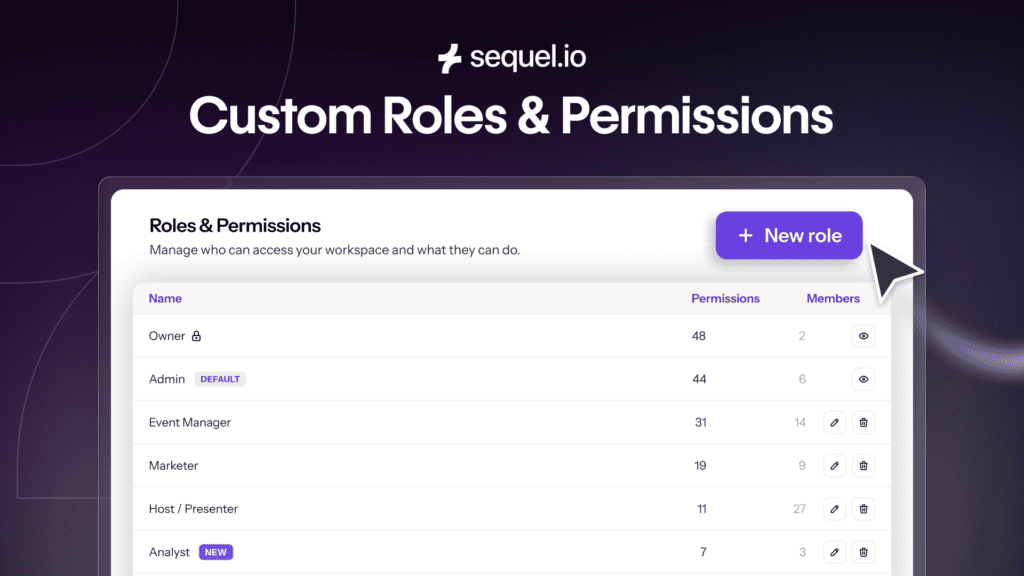
As your webinar and event program grows, so does the number of people who need access to it. What starts with one marketer quickly expands to include demand generation, marketing operations, field marketers, executives, agencies, contractors, sponsors, and regional teams.
That’s a sign your program is working, but the challenge is that not everyone needs the same level of access.
Your event manager needs to build registration pages and launch webinars, your CMO wants to check campaign performance, your agency needs to manage event logistics, a sponsor wants to understand how their session performed, and Marketing Operations needs complete administrative control.
Most webinar platforms make all of those people fit into the same handful of user roles. The result is a familiar tradeoff. Either you give people more access than you’re comfortable with, or you become the person exporting reports, taking screenshots, and answering requests because it’s easier than granting access.
Sequel built Custom Roles & Permissions to eliminate that tradeoff. Instead of deciding who gets full access, you can decide exactly what each person needs to do their job.
Collaboration should scale with your team
The best webinar programs aren’t run by one person anymore. They’re collaborative.
- Demand generation teams monitor campaign performance.
- Marketing Operations manages governance.
- Field marketers own regional events.
- Executives want visibility into results.
- Agencies help execute campaigns.
- Sponsors expect reporting.
As more people become involved, access becomes just as important as analytics – not because permissions are exciting, but because collaboration shouldn’t create more work.
Custom Roles & Permissions helps you safely involve more people in your programs while maintaining control over your event operations, audience data, and reporting.
Four common ways teams use Custom Roles
There are a number of ways that marketing teams use Sequel’s Custom Roles & Pemissions.
Work with agencies without exposing everything
Many marketing teams rely on agencies to build registration pages, manage event logistics, or coordinate webinar production. Before now, that often meant giving agencies broad platform access or handling every task internally.
With role-based permissions, agencies can access the areas they need while sensitive attendee data, Audience Insights, and account settings remain protected. Everyone can do their work without unnecessary exposure.
Give executives visibility without creating reporting work
Leadership teams don’t usually need to manage webinars, but they do want to understand what’s working.
Viewer roles make it easy for executives to access dashboards and performance reporting whenever they need it, without the ability to edit events or change settings. Instead of building another slide deck or exporting another spreadsheet, your leadership team can see the results directly.
Collaborate with sponsors and partners
Sponsors increasingly expect more than a summary email after an event. They want visibility into attendance, engagement, and performance.
Custom Roles & Permissions lets you share the information that’s relevant to them without exposing attendee records, broader analytics, or data from other events. That creates a better experience for partners while keeping your data under your control.
Support growing and distributed marketing teams
As organizations expand, webinar programs rarely stay centralized. Regional marketers may own their own events. Different business units may have different responsibilities. Marketing Operations still needs governance across the entire organization.
Custom Roles & Permissions lets every team work independently while maintaining consistent access controls across your account.
Governance that grows with your organization
Every organization doesn’t need the same level of governance. That’s why Sequel’s permissions model grows alongside your team.
Growth
Sequel’s Growth plan includes the essential administrative roles needed to run your event program, including Admin and Event Manager. It’s everything smaller teams need to collaborate effectively while keeping account management straightforward.
Business
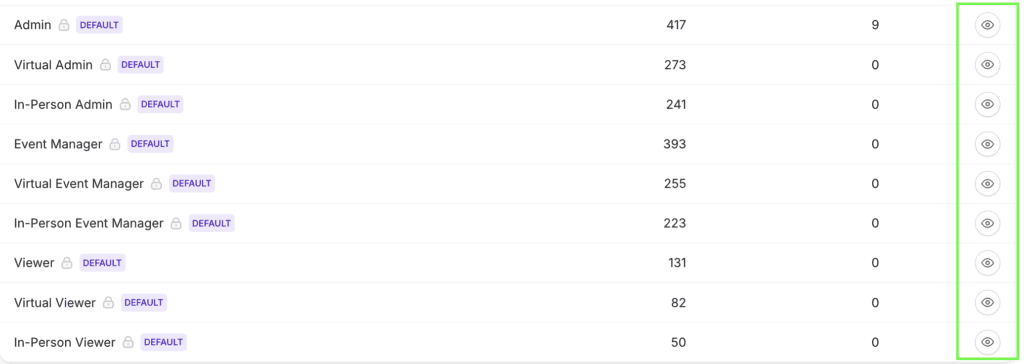
As more stakeholders become involved, Business adds nine built-in default roles that support common marketing, event, and operational workflows. Teams can quickly assign the right level of access without creating permissions from scratch.
Enterprise
For larger organizations with more complex governance needs, Enterprise includes those same nine built-in roles plus the ability to create fully custom role profiles. Whether you’re working across multiple departments, regions, agencies, or business units, you can build permissions that match your organization instead of adapting your organization to predefined roles.
Built for modern marketing organizations
Behind every role assignment is a permission model designed for real marketing teams. Permissions can be configured across events, registrations, participants, analytics, Audience Insights, account activities, event settings, virtual events, and in-person events. You can also create read-only experiences for stakeholders who only need visibility.
Most importantly, permissions are enforced at the platform level. Restricted information isn’t simply hidden in the interface. Users only have access to the data and functionality they’ve been granted. That gives organizations greater confidence when extending Sequel across more teams and more stakeholders.
Why this matters
Marketing teams have spent years thinking about how to generate more engagement. Today, they’re asking a different question.
How do we safely share the engagement data we’re already generating?
As webinars and events become more strategic, more people need access to the insights they produce. The challenge isn’t giving everyone access. It’s giving everyone the right access.
Custom Roles & Permissions helps you scale collaboration without sacrificing governance, so more people can contribute while your data stays protected.
Availability
Roles and permissions are available across all Sequel plans, with capabilities that grow alongside your organization.
- Growth includes the Admin and Event Manager roles.
- Business includes nine built-in default roles for common team workflows.
- Enterprise includes the nine built-in roles plus the ability to create fully custom role profiles tailored to your organization’s structure and governance needs.
For existing customers, the transition is seamless. Current Admin users remain Admins, and existing Members are automatically migrated to the Event Manager role, preserving today’s workflows while unlocking more flexibility as your team grows.
Whether you’re managing events with a small team today or supporting a global marketing organization tomorrow, Sequel’s permissions model is designed to grow with you.
👉 Book a demo to learn more about Sequel.
Frequently Asked Questions
What are Custom Roles & Permissions in Sequel?
Custom Roles & Permissions help you control who can access different parts of Sequel based on each person’s responsibilities. Instead of giving everyone the same level of access, you can assign roles that determine what users can view, edit, or manage across events, analytics, Audience Insights, and account settings.
Who are Custom Roles & Permissions designed for?
Custom Roles & Permissions are designed for marketing teams that collaborate across multiple people or departments. They’re especially useful for organizations that work with agencies, sponsors, contractors, executives, or regional teams that need different levels of access to event programs and reporting.
Why would I need role-based permissions for webinars and events?
As webinar and event programs grow, more people need access to the platform, but not everyone should be able to see or change everything. Role-based permissions make it easier to collaborate while protecting sensitive audience data, analytics, and account settings.
What’s the difference between built-in roles and custom roles?
Sequel includes predefined roles that cover common marketing and event workflows, making it easy to assign access without creating permissions from scratch. Enterprise customers can also create fully custom role profiles that match their organization’s structure, governance requirements, and internal responsibilities.
Can I control what users can see in analytics and Audience Insights?
Yes. Depending on the role you’ve assigned, users can be given access to specific areas of Sequel, including analytics, Audience Insights, event management, reporting, and account settings. Enterprise customers can create custom role profiles with more granular permissions to support complex governance requirements.
Can I give agencies, sponsors, or executives limited access?
Yes. One of the most common use cases for Custom Roles & Permissions is providing external partners or internal stakeholders with the visibility they need without giving them full administrative access. This helps teams collaborate more efficiently while maintaining control over sensitive information.
Which Sequel plans include Custom Roles & Permissions?
Every Sequel plan includes role-based access, with capabilities that grow alongside your organization.
- Growth includes the Admin and Event Manager roles.
- Business includes nine built-in default roles for common marketing and event workflows.
- Enterprise includes the nine built-in default roles plus the ability to create fully custom role profiles tailored to your organization’s structure and governance requirements.
How do Sequel’s roles and permissions compare to other webinar platforms?
Many webinar platforms offer a small number of fixed user roles with limited flexibility. Sequel’s permissions model is designed to grow with your organization, from essential administrative roles for smaller teams to predefined workflows for growing organizations and fully customizable role profiles for enterprises with more advanced governance needs.