Certifications with Polls and Quizzes
Your webinar runs for 45 minutes. Thirty people attend. Twenty-two of them meet the minimum watch time. Certifications go out.
But how many of those twenty-two were actually paying attention?
Watch time tells you someone had the window open. It can’t tell you they understood the material, engaged with the content, or retained anything from the session. For a product training webinar or a lunch-and-learn, that’s a soft problem. For a compliance program issuing CPE or CLE credits, it’s a real one.
Starting today, Sequel Certifications can require more than attendance. You can now make polls and quizzes part of the certification criteria, so earning a certificate proves participation and comprehension rather than just presence.
The Problem With Certifications That Only Measure Presence
Teams running customer education programs, product training, partner enablement, and continuing professional education have all run into the same issue: an attendee can leave a webinar running in the background, walk away from their computer, and still qualify for certification based on minutes watched.
That attendee technically attended. There’s no proof they engaged with anything.
For customer education teams, this makes completion rates less meaningful. You can say 200 people completed your onboarding webinar series, but you can’t say with confidence that those 200 people understood the product well enough to use it effectively.
For teams issuing CPE or CLE credits, the stakes are higher. Professional education credits are supposed to represent competency in a subject. A minutes-watched threshold can’t establish that. It only confirms the browser tab stayed open.
It also changes the dynamic during the session. When certification only requires sitting through the clock, attendees have no real reason to participate in polls, respond to prompts, or engage with the material in real time. The session turns into something to sit through instead of something to learn from.
Why Teams Build Workarounds (And Why the Workarounds Don’t Stick)
Without a way to tie certification to active engagement inside the event, teams have cobbled together alternatives.
Some send post-event quizzes through separate survey tools. Response rates drop fast once someone leaves the session, and the data lives in a different system than the event itself.
Some use external learning management systems that layer assessments on top of the webinar recording. That works for structured programs but adds complexity and cost, and it disconnects the assessment from the live experience.
Some just accept that their certification is really attendance tracking with a nicer name, and move on.
None of these approaches verify engagement at the moment it happens, inside the event, as part of the same experience the attendee is already in.
Polls and Quizzes Are Now Certification Requirements
Sequel Certifications now support two new requirement types alongside minutes watched.
Poll requirements mean attendees must respond to specific polls during the session to qualify for certification. This validates that someone was present and participating at key moments, not only logged in.
Quiz requirements go further. Attendees must answer quiz questions correctly. Participating in the quiz isn’t enough on its own; they have to get the answer right. This is what you use when you need to confirm someone understood the material.
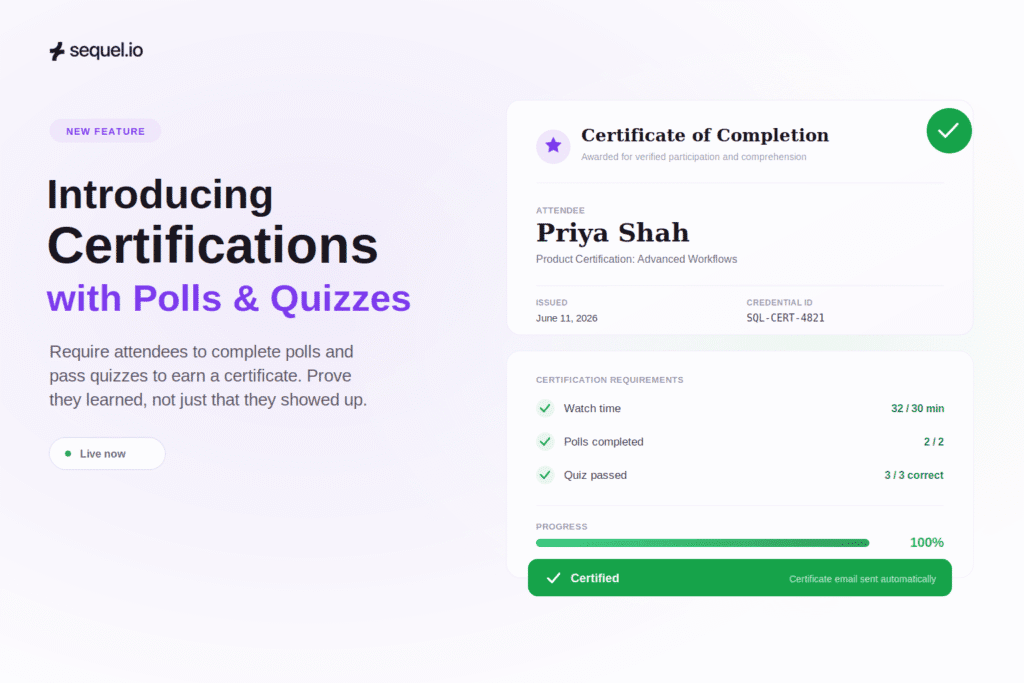
You can combine these with existing minute-based requirements. A certification might require 30 minutes of watch time, completion of two polls, and a passing score on a quiz. All three conditions must be met before the certificate is issued.
How Setup Works
The workflow stays inside the same certification settings you already use.
In your event settings, toggle certifications on and select a certificate. You’ll see two new sections for poll and quiz requirements. You can create polls and quizzes directly from the certification setup screen or assign ones you’ve already built.
Once a poll or quiz is assigned as a certification requirement, the system flags it if it hasn’t been scheduled or published yet. This surfaces in the automation tab with a clear warning: these polls are required for certification, but they haven’t been added to the event timeline.
From there, you schedule them the same way you schedule any other automation. Pick the poll, set the timing (say, four minutes into the presentation), and save. The required items are visually highlighted in the automation tab so your team can spot them quickly.
During the event, attendees see a progress indicator showing what they’ve completed and what they still need to do. When they respond to a required poll, it gets a green checkmark. When all requirements are met, they qualify.
After the event, certification emails evaluate the full set of criteria. If an attendee met the watch time requirement but skipped a required poll, the certificate doesn’t go out, and the email lets them know they didn’t meet all the requirements. If they completed everything, the certification is sent automatically.
How Teams Will Use This
A customer education team running a product training series adds a quiz question after each major feature walkthrough. Attendees who complete the series and pass the quizzes earn a certification that the CS team can reference in QBRs as evidence that the customer’s team has been properly trained. The certification carries weight because it tested comprehension, not attendance alone.
A compliance team issuing CLE credits for a legal webinar schedules two required polls at specific points in the session and a short quiz at the end. The polls confirm the attendee was present and engaged during the relevant segments. The quiz confirms they understood the material. The credits hold up because there’s a record of active participation and correct responses.
A product marketing team hosting a launch webinar wants to know whether attendees actually understood the new feature being demonstrated. They add a quick poll after the demo segment asking attendees to identify the primary use case. The responses serve double duty: certification requirement and real-time feedback on whether the demo landed.
A partner enablement team running quarterly certification webinars for channel partners replaces their external post-event quiz with an in-session quiz inside Sequel. Completion rates climb because partners don’t have to leave the event and open a separate tool, and the data stays connected to the rest of the partner’s engagement profile instead of living in a disconnected spreadsheet.
Getting Started
Certifications with polls and quizzes are available now in the same certification settings you already use. There’s no new interface and no extra configuration beyond assigning polls or quizzes as requirements and scheduling them. If certifications aren’t switched on for your account yet, reach out to your CSM and they can enable it.
If you’re already using Sequel Certifications, you can start adding poll and quiz requirements to your existing programs today. Your current minute-based certifications continue to work exactly as they do now.
Availability
Certifications with polls and quizzes work on live and simulive events, where timed interactions can be scheduled and tracked during the session. The feature is live now and doesn’t require a beta enrollment or separate activation. To turn certifications on for your account, reach out to your CSM.
What This Means for Certification Programs
Attendance has always been the starting point for event certifications. It was never meant to be the whole thing.
The reason it stayed that way is that measuring anything beyond attendance during a live event required stitching together separate tools and manual processes. Polls, quizzes, and certifications lived in different systems, and connecting them was more work than most teams could justify.
Now they’re part of the same workflow. You set the requirements, schedule the interactions, and the system handles validation and delivery. The people running your events don’t have to manage certification administration on top of everything else.
If you’re running education, training, or compliance programs through Sequel, this is in your dashboard today. If you’re evaluating Sequel for these use cases, book a demo and we can walk through how it works with your specific certification requirements.
Frequently Asked Questions
What Are Poll and Quiz Certification Requirements?
They let you require attendees to respond to specific polls or correctly answer quiz questions during an event before they qualify for certification. This works alongside existing minute-based watch time requirements.
What’s the Difference Between a Poll Requirement and a Quiz Requirement?
A poll requirement checks that the attendee participated by submitting a response, and any answer counts. A quiz requirement checks that the attendee answered correctly, so participation alone won’t satisfy it.
Can I Combine Polls, Quizzes, and Watch Time in a Single Certification?
Yes. You can require any combination. An attendee must meet all assigned requirements before receiving the certificate.
How Do Attendees Know What’s Required?
A progress indicator appears during the event showing which requirements have been completed and which are still outstanding. Completed items get a green checkmark.
Do I Have to Publish Polls and Quizzes Manually During the Event?
No. You can schedule them through the automation tab so they appear automatically at the right time. The system will warn you if any required polls or quizzes haven’t been scheduled yet.
What Happens if an Attendee Meets the Watch Time but Misses a Required Poll?
They won’t receive the certification. The post-event email will let them know they didn’t meet all the requirements.
Do I Need to Change My Existing Certification Setup?
No. Existing minute-based certifications continue to work. Poll and quiz requirements are optional additions.
Is This Available for On-Demand Events?
Certifications with polls and quizzes are built for live and simulive events, where timed interactions can be scheduled and tracked during the session.
Do I Need Any Technical Setup?
No. If you already know how to create a certification and schedule a poll automation, the process is the same. Polls and quizzes are assigned as requirements in the certification settings and scheduled in the automation tab.