ChatGPT App
Turn Webinar Content Into On-Brand GTM Assets Using the AI Tools Your Team Already Uses
Most B2B teams invest heavily in webinars. They plan them carefully, promote them aggressively, and bring the right people into the room. But once the session ends, the hardest part begins. Turning that event into usable content takes time. Transcripts get copied into documents. AI tools get involved. Brand voice gets reviewed. Teams rewrite and rework what should already be finished.
Sequel recognized this and built Sequel AI Studio to solve for it. Sequel customers can already use AI Studio natively within the Sequel platform to repurpose webinar content into AI video clips, blog posts, workbooks, guides and more.
And then last week, we released the Sequel MCP Server, which allows Sequel customers to access and repurpose their webinar transcript data in any AI-platform, from ChatGPT and Claude, to Gemini, Copilot and more.
Now we’re making it even easier for teams that use ChatGPT with the release of Sequel’s ChatGPT app – the first webinar platform to have an official ChatGPT app, available today in the ChatGPT app store.
Bringing webinar content into your existing AI workflow
This integration connects ChatGPT directly to your Sequel workspace, giving the AI tools you’re already using direct access to your webinar recordings and transcripts as source material – and giving you three options when it comes to using AI to repurpose webinar content:
- Work directly within Sequel AI Studio to create clips, blogs and other content
- Use Sequel’s MCP Server to connect your AI platform of choice to Sequel
- Install Sequel’s ChatGPT app via the ChatGPT app marketplace, connect with your Sequel account, and access your transcripts directly via ChatGPT
This new app means teams can work directly within ChatGPT to repurpose webinar content using their existing custom GPTs trained on company voice, personas, and messaging to create content that is on-message and on-brand.
What teams can now do day to day
With the Sequel ChatGPT Integration, teams can:
- Use ChatGPT with direct access to webinar recordings and transcripts, without manual exports
- Apply existing custom GPTs so outputs reflect your brand voice and messaging by default
- Generate blogs, long-form content, follow-up emails, playbooks, and internal assets from event content
- Easily create net new content assets that pull information from across your entire webinar program, rather than one single webinar transcript
- Support multiple teams from the same source content instead of duplicating effort
Each of these capabilities saves time, improves the quality of the content you’re creating, and reduces friction that teams have learned to accept as normal. And now you can get started quickly using Sequel’s webinar transcript prompt library.
What teams are actually doing with it
The most important thing to understand about the ChatGPT integration is that it works in two distinct modes, and the difference matters depending on what you’re trying to produce.
- The first is single-transcript work. You point the integration at one specific event, and you get outputs grounded in exactly what was said in that session. A demand gen team running follow-up sequences after a product launch webinar doesn’t want a generic nurture email. They want something that reflects the actual conversation buyers attended. With direct access to the transcript, ChatGPT can write follow-up emails that reference the specific frameworks a speaker introduced, the questions that came up from the audience, the exact language the host used to describe a customer pain. That’s a different class of output than starting from scratch.
- The second mode is cross-transcript analysis, and this is where the integration’s potential gets genuinely interesting. When you feed several transcripts into a prompt together, patterns start to surface that aren’t visible in any single session. This could include pain points that came up across five different events, the specific vocabulary buyers use when they describe a problem they can’t solve, objections that show up repeatedly in Q&A, and themes that have been building across a year’s worth of conversations with your market.
We’re already seeing Sequel customers (and our own team here at Sequel) using the app in interesting ways, including:
- Content teams are using this to run full voice-of-customer pulls. Not surveys or focus groups – the actual language from real practitioners, captured during events where they were being candid about what’s working and what isn’t. That raw material becomes the foundation for messaging documents, positioning work, and category framing that sounds like it came from customers (because it did).
- Product marketing teams are finding it particularly useful for launch events. After a webinar where the product is demonstrated and customers ask questions live, there’s a transcript full of real buyer reactions. Using the ChatGPT app, you can easily surface what confused people, what excited them. What objections they voiced politely and what they said when they pushed back. That’s usable research for sales enablement materials, FAQ pages, and positioning refinements that would otherwise take weeks to produce through a formal research process.
- Field and event teams have a different problem: regional content that reflects the specific audience in the room, not a national deck repurposed for a different city. When you have recordings from a series of regional events, the integration lets you treat that archive as a source document. A product marketer in EMEA can pull insights from three London roundtables and use them to build assets that actually speak to what European buyers said they cared about.
- For CS and sales, the use case is internal as much as external. Customer success teams can pull customer interviews into a prompt alongside a few other conversations and generate materials that mirror the language their accounts actually use. Onboarding documentation written with that vocabulary lands differently than documentation written in marketing-speak. Sales teams can do the same thing to prep for conversations with specific verticals, reviewing what practitioners in that space have said on Sequel events and building talk tracks from real examples.
The underlying premise of the prompt library we’ve released alongside this integration is that a strong prompt doesn’t just describe a task. It specifies what kind of content you want produced, what analytical lens to apply, what the output will be used for, and what guardrails to hold to (particularly around not paraphrasing quotes, not inventing metrics, not generalizing beyond what speakers actually said).
The prompts are detailed by design. The difference between “summarize this webinar” and a well-structured prompt that defines the role, the objective, the source material, and the output format is the difference between a generic recap and a publishable asset.
We’ve built a full library of these prompts for the specific outputs B2B marketing teams need most including blog posts, quote pulls for social, short-form video clip identification, case studies built from customer interviews, testimonial extraction, pain point analysis, industry insights reports, content strategy generation, best practice guides, and voice-of-customer vocabulary mapping. Each prompt is designed to work with your existing custom GPTs, so the outputs arrive in your brand voice rather than requiring a separate editing pass to strip out the AI tone.
The event archive most teams have already built is more valuable than they’re treating it. This integration is the mechanism for changing that.
Getting started is straightforward
The ChatGPT app is available directly within ChatGPT’s app marketplace.
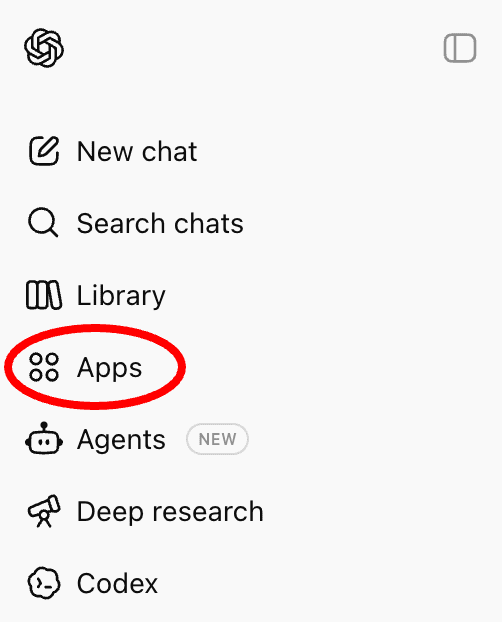
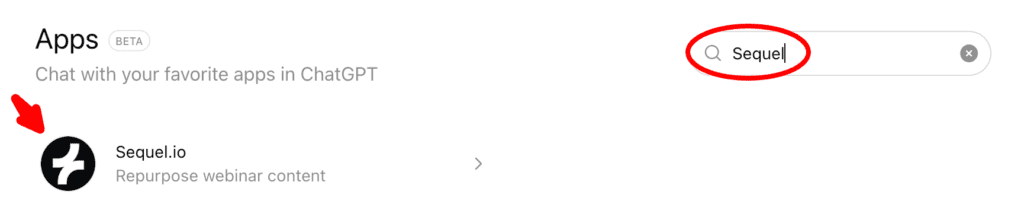
Simply visit the app marketplace, type “Sequel” into the search bar, and then click to select the app.
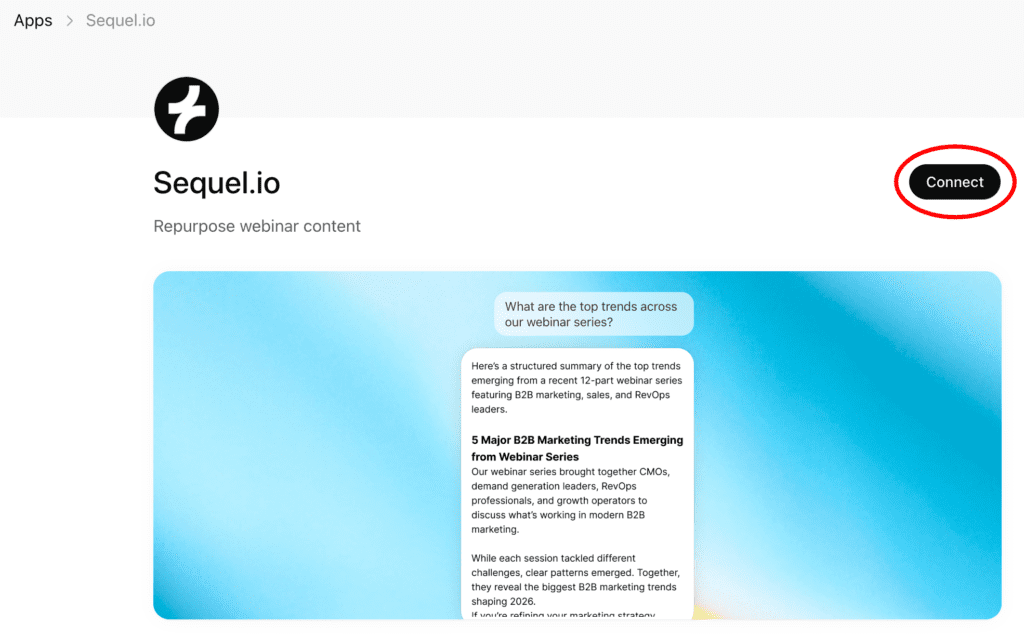
Once you’ve selected the app, simply click “Connect” and then authenticate using your Sequel credentials. It’s that simple!
From there, you can use ChatGPT exactly as you do today, now with Sequel content available as context. There is no new workflow to learn and no separate system to manage.
Included across all Sequel plans
The Sequel ChatGPT App is included in all Sequel plans, at no additional cost, with no add-ons or upgrades required.
If you are an existing customer, you can start exploring the app today. If you are evaluating Sequel, this is another example of how the platform helps teams turn engagement into practical GTM output.
👉 Book a demo to learn more about Sequel or explore our ChatGPT app.
Frequently Asked Questions
What is the Sequel ChatGPT App and what does it do?
The Sequel ChatGPT App connects ChatGPT directly to your Sequel webinar recordings and transcripts. It allows teams to use ChatGPT to create follow-up emails, blogs, enablement content, and other assets based on real webinar conversations. This turns webinars into a reusable content engine instead of static recordings.
Who is the Sequel ChatGPT App designed for?
The Sequel ChatGPT App is designed for B2B marketing, demand generation, field marketing, and marketing operations teams that run webinars. It is especially relevant for teams using ChatGPT today who want AI outputs grounded in real buyer engagement and on-brand messaging.
How does the Sequel ChatGPT App work at a high level?
Sequel securely makes your webinar recordings and transcripts available as context inside ChatGPT. Teams continue using ChatGPT and their existing custom GPTs, but now AI outputs are informed by actual webinar content captured on your owned site, with no manual exporting or copy-pasting required.
Do I need a Sequel account to use the ChatGPT App?
Yes. The ChatGPT App is available to teams using Sequel for webinars and event content. The integration works by connecting ChatGPT to your Sequel workspace and its webinar library.
Is the Sequel ChatGPT App included in all Sequel plans?
Yes. The Sequel ChatGPT App is included in all Sequel plans at no additional cost.
How is this different from using ChatGPT on my own with webinar transcripts?
Using ChatGPT on your own typically requires manually copying transcripts and providing context each time. The Sequel ChatGPT App removes that friction by making webinar content available directly inside ChatGPT.
How does the Sequel ChatGPT App compare to other webinar platforms?
Sequel is the first webinar platform with a native ChatGPT app. Other webinar tools focus on hosting or production, and many have MCP servers, but this type of native app makes it easy and fast for non-technical users to connect ChatGPT to their Sequel account and access and repurpose webinar content.
Do I need technical skills or custom development to use this integration?
No. The Sequel ChatGPT App does not require coding or technical setup. Teams use ChatGPT the same way they already do, with Sequel providing the webinar context automatically.
What are some examples of prompts I can use with the Sequel ChatGPT app?
You can use the Sequel ChatGPT app to query individual webinar transcripts, or multiple transcripts at one. This sample prompt library contains examples of prompts that you can use to create marketing content, extract customer success stories and testimonials, extract customer insights, and refine messaging,