Webflow Integration
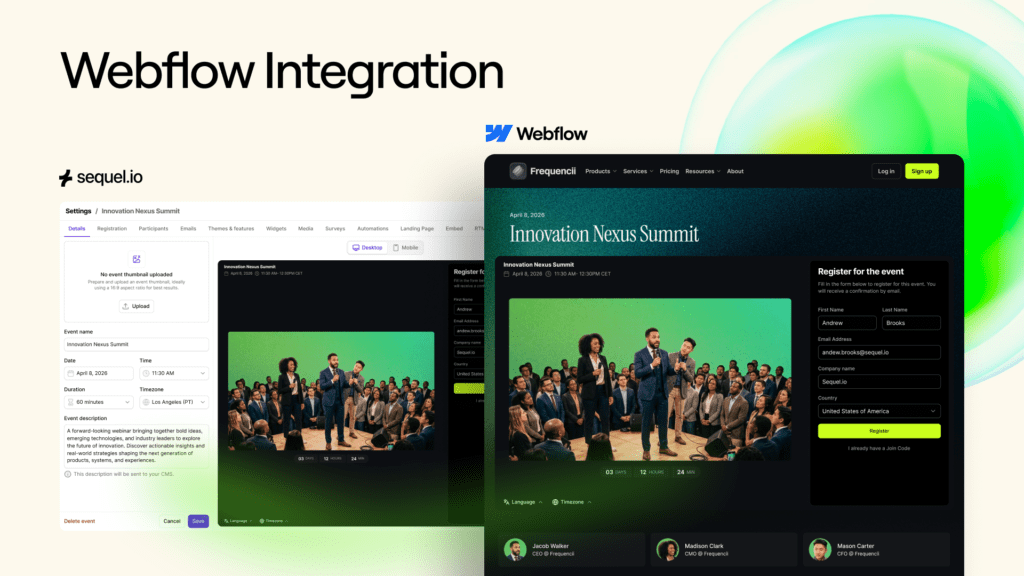
Keep Your Webflow Website Automatically in Sync With Your Event Calendar
Marketing teams are running more events than ever, including webinars, which for many companies are part of an ongoing content engine. Marketing webinars, product education series, customer workshops, and large virtual events all live alongside the rest of your website content.
But publishing those events to the website often slows everything down.
A new webinar gets created. Then someone needs to open the CMS, create a new page, copy over the details, embed the event, and publish it. If speakers change or the schedule updates, the page has to be edited again.
What should take minutes can easily stretch into days, especially when engineering or web teams are involved. As event programs scale, this friction becomes a real operational bottleneck.
As the only webinar platform purpose-built to host webinars on your website, this is exactly the problem Sequel was designed to solve.
Why Webflow?
Webflow became the go-to CMS for marketing teams that wanted direct control over what their site looks like and says, without needing to know how to write code. That shift matters more than it sounds. When you can move at your own pace, you stop building campaigns around your website’s limitations.
What drew teams to it wasn’t just the no-code editor. It was the underlying logic: a visual design environment that generates clean, production-quality HTML, CSS, and JavaScript, with CMS infrastructure solid enough to support serious content operations. Marketers could redesign a landing page, publish a new resource, stand up a campaign page — without opening a Jira ticket. The site could actually keep up with the business.
More recently, that appeal has expanded. Webflow’s growing support for agentic workflows means teams can automate content publishing, trigger site updates from external data sources, and build interactive experiences that respond dynamically to visitor behavior. The site stops being a static brochure that needs a human to update it and starts behaving more like a living system. For marketing teams already running leaner than they’d like, that’s not a nice-to-have.
It’s no surprise that many Sequel customers are also using Webflow, and vice versa. Both companies are building toward the same underlying idea: that marketing teams should own more of their stack and depend on fewer intermediaries to execute.
Sequel customers who run their events natively on their own website, capture first-party data directly, and push that data into their CRM without a third-party platform in the middle are already thinking about their website as infrastructure. Webflow is a natural fit for that mindset.
A simpler way to connect Sequel to your Webflow site
Sequel customers using Webflow have always been able to embed their Sequel webinars on their websites, but the the process involved in doing that required building automation with tools like Zapier to keep the two systems in sync.
Today we’re introducing Sequel for Webflow, a native Webflow Marketplace app designed to eliminate friction and make integrating your Sequel webinars with your Webflow website fast, easy, and seamless.
The integration is available in the Sequel Marketplace and is a simple, one-click installation. Once installed, Sequel connects directly to your Webflow site and automatically keeps your event data and website content aligned. When an event is created or updated in Sequel, the corresponding entry in your Webflow CMS updates automatically — no copy and paste, no middleware, and no manual edits. Inside Webflow Designer, you can also browse your Sequel events and drop a fully rendered event component onto any page.
The result is a straightforward workflow. Create the event in Sequel, publish the page in Webflow, and the two stay in sync automatically.
What marketing teams can do now
Sequel for Webflow introduces a few practical improvements that make publishing Sequel events on your Webflow website much easier.
- Publish event pages without writing code: Marketing teams can add event experiences directly inside Webflow Designer. Instead of copying embed code or coordinating with engineering, you simply select the event from your Sequel account and place it on the page. This keeps the publishing workflow entirely inside the tools marketing teams already use.
- Keep your event information automatically updated: When event details change in Sequel, the updates appear in Webflow automatically. Titles, dates, descriptions, speakers, and registration links stay aligned between systems, so your website always reflects the latest information. This removes one of the most common sources of friction in event programs: maintaining multiple versions of the same event details.
- Maintain a live event directory on your website: Because Sequel events sync directly into your Webflow CMS, you can build dynamic event directories and webinar libraries. As new events are created in Sequel, new CMS entries appear automatically. As events change, the listings update in real time. For teams running frequent webinars or multi-session events, this keeps the website current without ongoing manual work.
- Keep the event experience fully on your website: All event experiences remain embedded directly on your site, using your existing Webflow styling and layout. Visitors stay inside your brand environment rather than being redirected to a separate event page.
Getting started with the integration
The Webflow integration is available across Sequel plans, at no additional cost, via a 1-click integration directly from the Sequel Marketplace. After installation, you log in using your existing Sequel credentials and choose which Webflow CMS collection should receive your event data. From there, new events created in Sequel automatically generate or update entries in your CMS.
Inside Webflow Designer, the Sequel panel lets you browse your event library and place event embeds onto any page.
If you’re an existing Sequel customer and would like help setting it up, your Customer Success contact can assist with configuration and best practices.
Building toward more connected website experiences
Sequel’s approach has always centered on running event experiences directly on your website rather than sending audiences to a third-party platform. Connecting Sequel more deeply to CMS platforms like Webflow makes that model easier to implement in day-to-day marketing workflows. As more teams treat their websites as the hub for events, content, and engagement, keeping those systems connected becomes increasingly important.
Bringing event publishing back into the marketing workflow
Running events should not require a complicated publishing process. With Sequel for Webflow, marketing teams can create events, publish pages, and keep their website updated without extra steps or engineering support.
If your team is running events on a Webflow site today, it’s worth exploring how the integration fits into your existing workflow.
You can find Sequel for Webflow in the Sequel Marketplace or speak with your Sequel account manager to learn more.
👉 Book a demo to learn more about Sequel or explore the Webflow integration.